The popup builder Shopify merchants actually enjoy using.
The Shopify popup builder where you build the whole thing yourself — free-form, no code, no developer. Snap-to-grid blocks, desktop and mobile edited separately, and gamification like spin-the-wheel and the product quiz built in. Turn traffic into revenue in the time it takes to brief a developer.
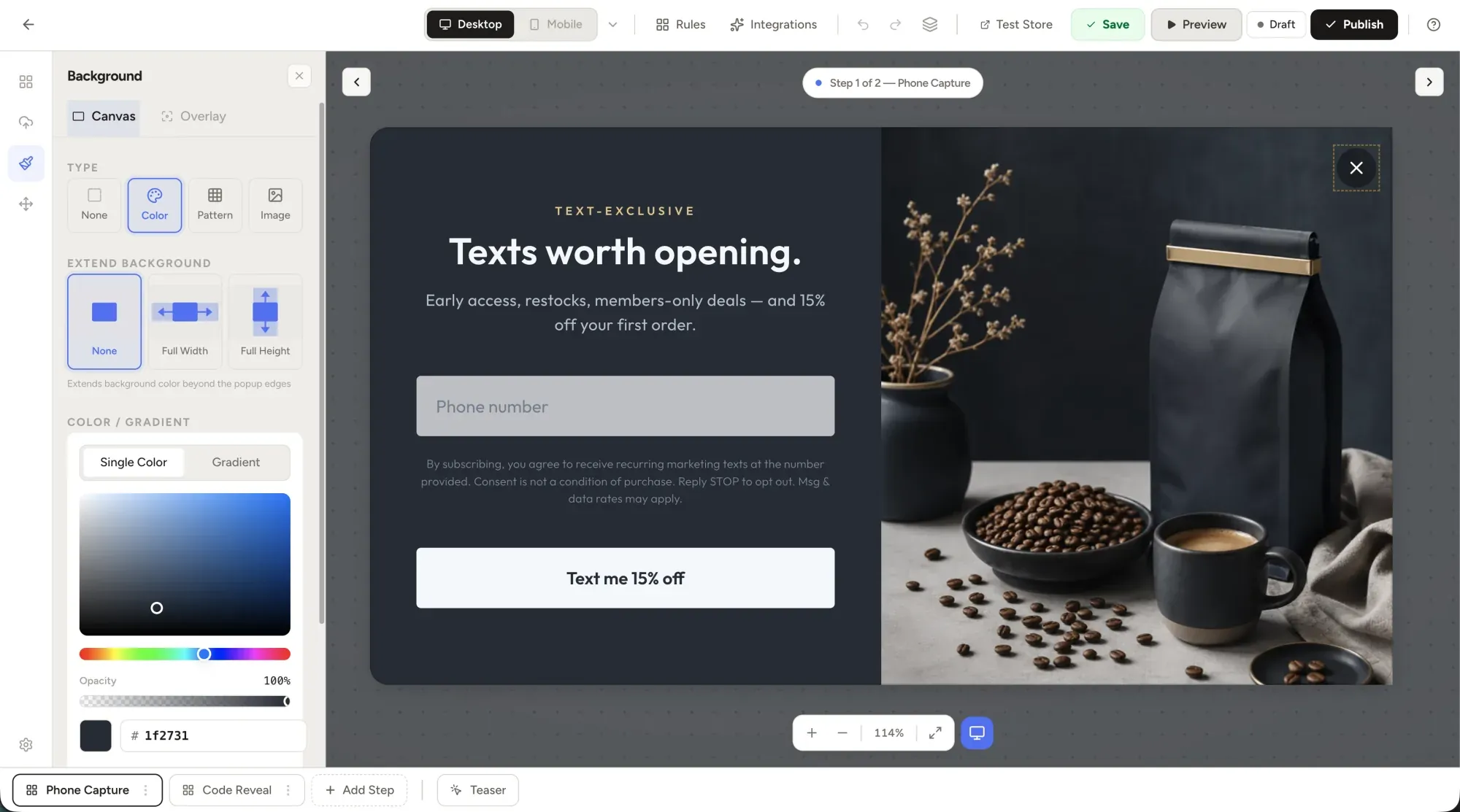
Every feature you'd build last,
shipped first.
Drag-and-drop is the floor. The features below are what separate a popup tool you tolerate from one your team actually uses every day.
Drag any element anywhere.
Every block you need — heading, text, button, image, shape, email field, spin wheel, coupon, countdown and graphics. Snap-to-grid that turns off when you hold ⌥. Pixel placement when you need it.
Mobile, separately.
Edit desktop and mobile as different layouts — not the same layout scaled down.
Conditional logic, no code.
URL, country, device, scroll depth, referrer, visit count — all chained without a script.
Games that turn traffic into revenue.
Spin-the-wheel averages 13.2% conversion and the product quiz is live now — drag either into any popup, no code. Scratch card, pick-a-gift and reel of coupons are on the way.
Ship it yourself. No developer.
Build the whole campaign — layout, copy, targeting, publish — with no ticket to design or dev. Go from idea to a live popup turning browsers into buyers the same afternoon.
A/B variants, one click.
Duplicate any popup as variant B. Stats roll up automatically.
Live preview, always.
Every keystroke renders. Hover the trigger to fire the popup in-canvas.
Built for marketers.
Loved by designers.
The same editor that lets a CRM manager ship a campaign Friday afternoon lets a design lead pixel-tune the chrome on Monday morning. No segmented "pro mode."
// For the marketerShip by lunch. Test by Monday.
No CSS, no waiting on design, no Jira ticket. Pick a template, edit copy, set a trigger, hit publish. Most growth leads ship their first WooHoo campaign within an hour of signup.
- Templates that work — each one ships with a benchmark conversion rate, mobile-tuned and easy to restyle.
- A/B test in one click — no separate flow, no statistical-significance calculator.
- Klaviyo, Mailchimp & Omnisend wired natively — plus Shopify Email; captured emails route by list and tag.
- Conditional logic without code — visit count, scroll depth, device, country.
- Calendar of campaigns — schedule Black Friday in July, forget about it until November.
// For the designerPixel control. Brand fidelity.
Pixel control without code — layers, custom fonts and precise placement, right in the visual editor. If you can design it in Figma, you can ship it here — without a developer.
- Pixel-precise placement — drag any element anywhere, snap-to-grid or nudge to the pixel.
- Custom fonts — upload WOFF2 or link any Google / Adobe Fonts URL.
- Layers panel with z-index control. Right-click → "Bring to front", just like Figma.
- Version history — step back through named changes, restore in one click.
Build it, ship it,
see exactly what works.
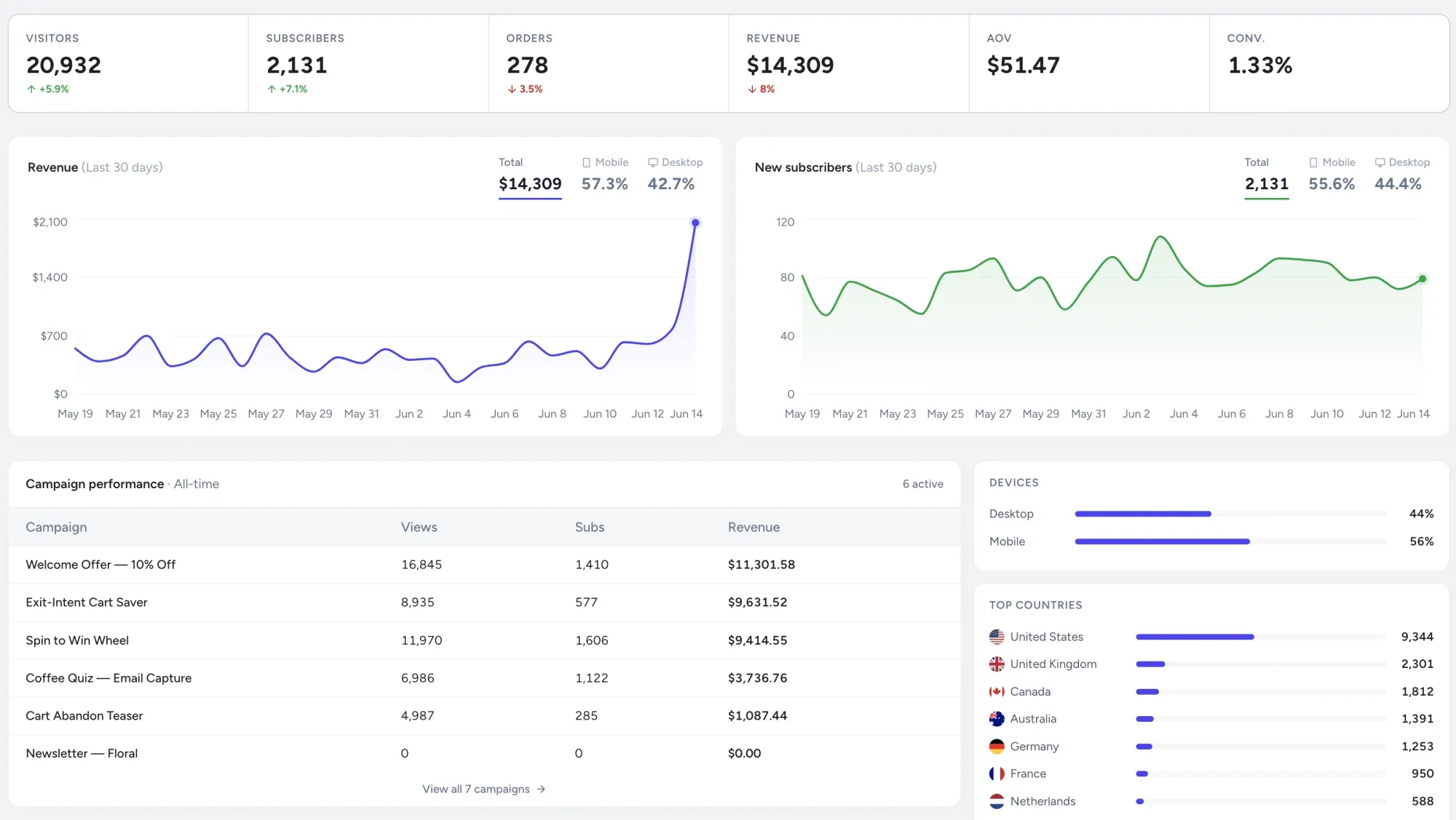
Every campaign reports signups, conversion and revenue in real time — so you can compare before vs. after by popup type and double down on what's actually driving orders.
Editor questions.
The same builder ships gamified popups and the spin-to-win popup for Shopify. Anything else? team@getwoohoo.com.
Do I need to know code to build a popup on Shopify?+
Does the popup builder work with my Shopify theme?+
Can I build the popup once and edit the mobile layout separately?+
Open the editor.
See for yourself.
The public sandbox is a real WooHoo account with all templates, all games, and the full editor unlocked. No card, no email, no demo call. Save your work to your account when you decide you like it.